
Russian Visa Invitation Scams: How to Check If a Letter Is Real or Fake
Learn what can and cannot be verified online, how to check the issuing tour operator, which document fields to inspect, and when to contact the provider or consulate.
Reviewed by iVisa Editorial Team. Official sources last checked 2026-09-04.
To receive a tourist invitation to Russia, please indicate your citizenship. You will be provided with a registration form. Fill in all the fields carefully, then proceed to the next step to confirm and pay for your invitation.
There is no universal public website that authenticates every Russian tourist-invitation PDF. Check the issuing tour operator in the federal register, compare the document with your passport and trip, contact the named issuer through independently found details, and ask the receiving mission if its instructions leave a material doubt. A provider's internal order check is not government verification.
What you can verify — and what you cannot
The federal tour-operator register can help confirm that the organization named on a tourist confirmation exists in the official register.[1] It does not prove that a particular attachment was issued by that operator, that it has not been altered or that a consulate will accept the complete application.
A provider may also offer an internal order lookup. That can confirm that the provider has a record matching its own reference, but it is not a Ministry of Foreign Affairs, consular or border-control authentication service. Treat any website that blurs that distinction with caution.
Registry check = organization check. Internal order lookup = provider-record check. Consular review = application decision. These are three different things.
Red flags before you pay
Scams often rely on urgency and absolute promises. A seller that guarantees visa approval, says every consulate must accept its file, hides the issuing organization or requests payment through an unrelated personal account creates avoidable risk.
A low price is not automatically a scam and a polished website is not automatically legitimate. Use verifiable details: the legal or trading name, register entry, clear document description, correction policy, support channel and a payment page that identifies the merchant.
- The seller will not name the issuing tour operator
- The document contains a different traveller or passport number
- The dates or itinerary conflict with your application
- The PDF asks the applicant to edit official-looking fields
- The seller promises guaranteed visa issuance
- Support contacts cannot explain how errors are corrected
- The domain, merchant name and issuing organization have no clear relationship
A safe verification sequence
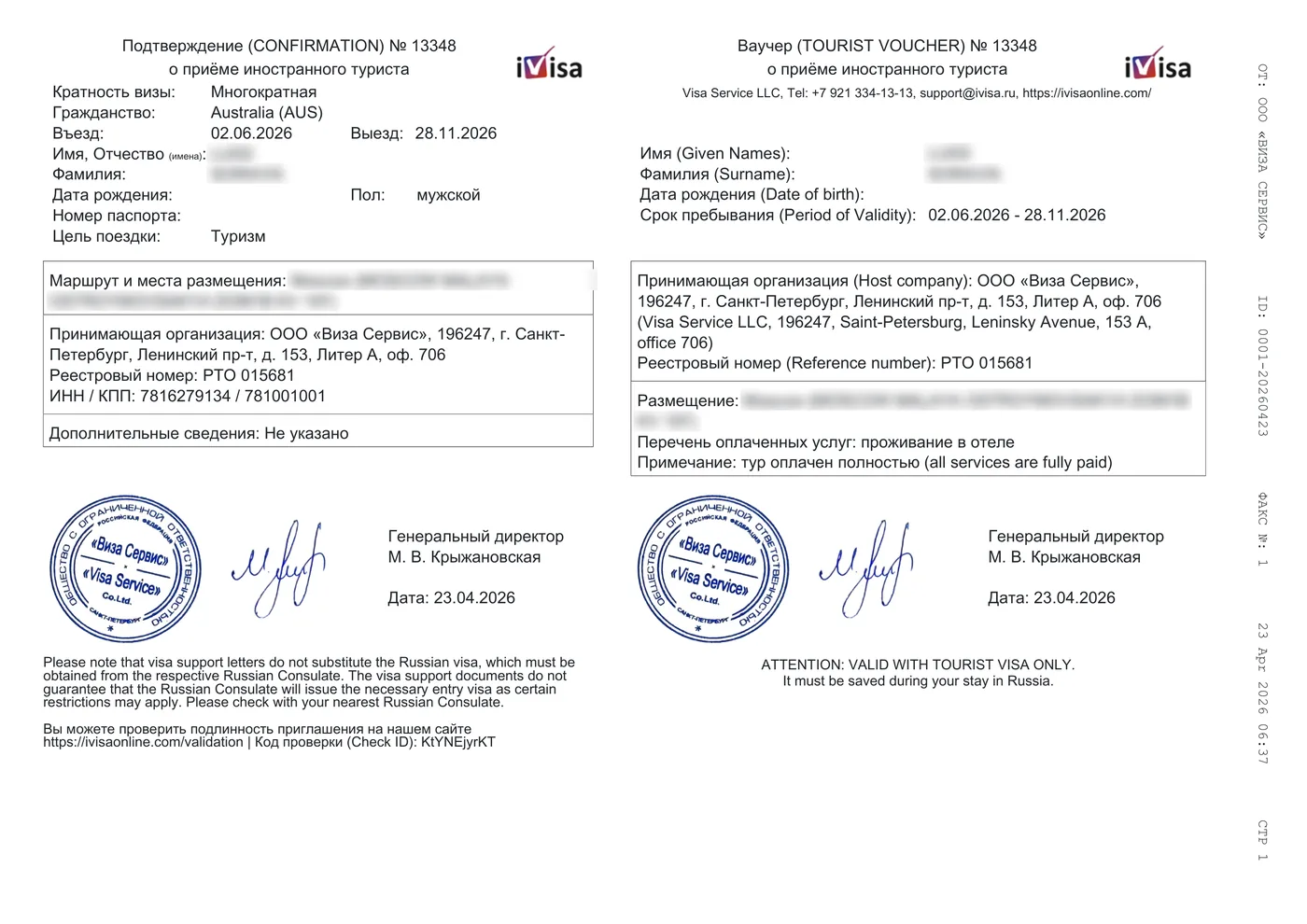
Start with the document itself. Compare the name, passport number, citizenship, dates, itinerary, host organization and reference information with your passport and planned application. Current New York tourist-visa instructions describe those core voucher fields and warn that voucher data must correspond to the passport.[2]
Next, search the federal tour-operator register for the issuing organization.[1] Use independently located contact details when you need to ask whether the organization or provider issued the document. Finally, consult the responsible mission's current checklist if the document format or supporting evidence differs from what that mission requests.
| Check | What it can establish | What it cannot establish |
|---|---|---|
| Passport and itinerary comparison | Internal consistency | Issuer authenticity or visa approval |
| Federal operator register | Operator registration | Authenticity of a specific PDF |
| Provider order lookup | Provider-side record | Government or consular validation |
| Consular instructions | Filing requirements | Approval before the application is reviewed |
What to do when something is wrong
Do not edit the invitation yourself. Ask the issuer for a corrected version and keep the correspondence. If the seller will not correct a passport mismatch or identify the issuer, stop using the document and preserve payment records.
If you have already filed, follow the consulate or visa centre's instructions. The appropriate correction path depends on whether the issue is in the invitation, application form or passport data. The official visa application is completed through the MFA system.[3]
Continue with the right canonical guide
Follow the invitation verification guide
Use the existing verification canonical for the detailed check workflow and its limits.
Inspect an anonymized invitation sample
Learn which fields to compare without treating the sample as an authenticity template.
Understand voucher and support-letter terminology
Separate document terminology from authenticity claims.
Frequently asked questions
Can I check a Russian invitation letter online?
You can check the issuing tour operator in the federal register and may be able to check a provider's internal order record. Neither check is a universal government authentication of an individual PDF.
Does a registration number prove the invitation is genuine?
A valid operator registration is useful evidence about the organization, but a copied number can appear on an altered or fabricated document. Check the document data and contact the issuer independently when necessary.
Can iVisa verify an invitation from another provider?
No. iVisa can confirm only records within its own workflow. It should not be presented as a government or cross-provider authentication system.
Will the consulate tell me in advance that my visa will be approved?
No invitation or preliminary check guarantees a visa decision. The consular authority reviews the complete application and may request additional information.
Official sources
- [1] Russian Ministry of Economic Development — Tour-operator register
- [2] Russian Consulate in New York — Tourist visa requirements
- [3] Russian MFA — Visa application form
Rules, fees and filing channels can change. Recheck the responsible mission or official portal immediately before applying.